| |
Leaderboards
By SD_Ryoko
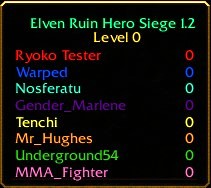
Leaderboards are a very simple score board for players to keep track of their kills or points.
You don't need any tools or other programs to make one.
Leaderboards can only keep track of two columns: a name and a value.
If you need more than two columns, you need to create a multiboard.
However, leaderboards are a lot simpler to create.
When laying out your leaderboard, remember that they accept the standard Warcraft color codes and characters.
You can use a color coding program to create a nice title, and space it out on different lines as shown.
You can also later modify the title and properties of the leaderboard contents.
All you need to create a leaderboard is two triggers.
One to create the board, and one to keep score.
- Leaderboards can only keep track of a name, and a value.
- Leaderboards can use the common Warcraft color codes.
- Leaderboards can be assigned a variable, to show and hide them easily.
- A leaderboard cannot be created at map initialization.
- A leaderboard is a lot more simple than a multiboard.
You cannot create the board at map initialization.
This is a very common reason a leaderboard doesn't work.
You can create the board after doing various things at the start of the map, or you can just have it wait 5 seconds or so.
Most of my maps do the map initialization first, then call a separate trigger to create the board when done.
Waiting a little also helps with laggers who drop at the beginning of the game.
In this example trigger, I am going to wait five seconds.
My example is simple.
Five seconds into the game, pick all players and check that they are playing and controlled by a user.
Add each of these players to the leaderboard.
When it's done, show the leaderboard to all players.
Leaderboard
    Events
        Time - Elapsed game time is 5.00 seconds
    Conditions
    Actions
        Leaderboard - Create a leaderboard for (All players) titled (Your Title Here)
        Player Group - Pick every player in (All players) and do (Actions)
            Loop - Actions
                If (All Conditions are True) then do (Then Actions) else do (Else Actions)
                    If - Conditions
                        ((Picked player) controller) Equal to User
                    Then - Actions
                        Leaderboard - Add (Picked player) to (Last created leaderboard) with label (Name of (Picked player)) and value 0
                    Else - Actions
        Leaderboard - Show (Last created leaderboard) (Must come last)
A leaderboard can keep track of several different things.
Maybe you want your board to keep track of kills.
If you're playing 'capture the flag', you would want to keep track of flags stolen.
Because the board works off integers, you can assign it any integer values you like.
In my map, I want the leaderboard to keep track of kills.
Of course, this is the most common use for a leaderboard.
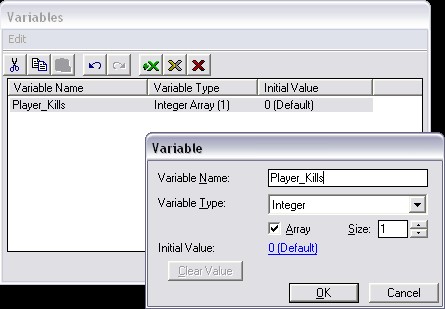
So I will first need to create a variable to keep track of kills for each player.
I will open the variable editor, and create a new integer variable called Player_Kills.
Then I will check the Array box to keep track of more than one value.
Now we will need a trigger to tally score.
Again, leaderboards work on values and integers.
In my example, I need to keep track of kills.
You can see maps online where the players jump all around the leaderboard, because they are all zero.
This is not only annoying, it's bad practice and it can cause lag.
Only update your board when needed, not every second or so.
My example trigger is really simple.
The trigger will run every time a unit dies.
irst it will check that the killing unit belongs to a player, and not a computer.
Then It will add one point to the owner of the killing unit's score.
Lastly, it will update the leaderboard value for that player.
Trigger Tally Score
    Events
        Unit - A unit Dies
    Conditions
        ((Killing unit) belongs to an ally of Player 1 (Red)) Equal to True
    Actions
        Set Player_Kills[(Player number of (Owner of (Killing unit)))] = (Player_Kills[(Player number of (Owner of (Killing unit)))] + 1)
        Leaderboard - Change the value for (Owner of (Killing unit)) in (Last created leaderboard) to Player_Kills[(Player number of (Owner of (Killing unit)))]
        Leaderboard - Sort (Last created leaderboard) by Value in Descending order
- Leaderboard - Create
- Creates the leaderboard. Also assigns a title and which players can see it.
- Leaderboard - Destroy
- Destroys a leaderboard. Once you destroy a board, you can no longer see it or manipulate it.
- Leaderboard - Show/Hide
- Shows and hides the leaderboard. Applies to all players that can see it. You can still manipulate the board when it is hidden.
- Leaderboard - Change Title
- Changes the title of the leaderboard. Remember, it can use common Warcraft color codes as well.
- Leaderboard - Change Label Colors
- Changes the color of a players label. By default, the label will be the game color of that player. So, player number 1 is red and player number 4 is purple.
- Leaderboard - Change Value Colors
- Changes the color of a players score. Again, by default, this will correspond with the players game color.
- Leaderboard - Change Style
- Changes the leaderboard style. You can hide the title, labels, or player values, for all players.
- Leaderboard - Add Player
- Adds a player to the leaderboard.
- Leaderboard - Remove Player
- Removes a player from the leaderboard. This is handy when a player quits or is defeated.
- Leaderboard - Change Player Label
- Changes the label for a player. Usually, this is the name of the player. Some maps change the name to (Quit) when a player leaves.
- Leaderboard - Change Player Label Color
- Changes the color of a players label. This is also handy if someone leaves. Sometimes the player name will change gray.
- Leaderboard - Change Player Value
- Updates the value, or score, for a player.
- Leaderboard - Change Player Value Color
- Changes the color of a players score. Again, by default, this will correspond with the players game color.
- Leaderboard - Change Player Style
- Changes the leaderboard style. You can hide the labels or player values, for a specific player.
|
|